Discord
Join the Discord Server
The Timbre 2026 Discord server is designed to make the conference experience as connected and accessible as possible. Discord is a free platform available on any device: you can download the app or use it directly from your browser at discord.com.
The server has text channels organized around conference themes and sessions, so you can jump into the conversations that matter most to you.
What You Can Do on the Server
Connect around research themes: Each channel is organized by topic so you can find and introduce yourself to attendees who share your area of interest, and and also discover other research themes.
Engage with speakers: Post questions or comments related to a talk and speakers can respond asynchronously before or after their session.
Stay updated: Get real-time announcements from the organizers, including any schedule changes or logistical updates.
Sort out logistics: Use the dedicated lodging and travel channels to coordinate with fellow attendees on accommodation, rides, or local tips.
Network beyond the conference: The server stays active after the event, so conversations and connections don’t have to stop when the conference does.
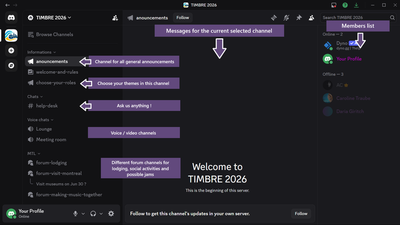
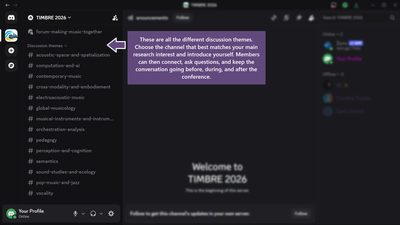
How to Join
The invite link has been sent to all registered participants par email. Please email us at timbreconference@gmail.com if you need a new invite link.
Once you’re in, don’t forget to identify your themes and introduce yourself!
If you have an account, or after you’ve created one, make sure to edit your server nickname so it matches your real name. Here’s how:
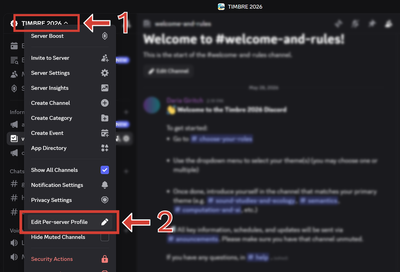
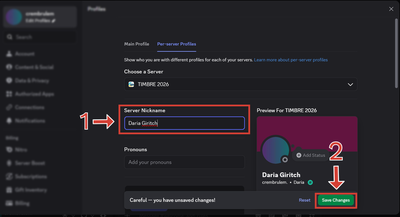
If you don’t have an account yet, this guide walks you through creating one.